
Student Acceptable Use Agreement for the use of ICT
School / Academy Policy
Digital technologies have become integral to the lives of children and young people, both within schools and outside school. These technologies are powerful tools, which open up new opportunities for everyone. These technologies can stimulate discussion, promote creativity and stimulate awareness of context to promote effective learning. Young people should have an entitlement to safe internet access at all times.
This Acceptable Use Policy is intended to ensure:
- that young people will be responsible users and stay safe while using the internet and other digital technologies for educational, personal and recreational use.
- that school systems and users are protected from accidental or deliberate misuse that could put the security of the systems and users at risk.
The school will try to ensure that students / pupils will have good access to digital technologies to enhance their learning and will, in return, expect the students / pupils to agree to be responsible users.
Acceptable Use Policy Agreement
I understand that I must use school ICT systems in a responsible way, to ensure that there is no risk to my safety or to the safety and security of the ICT systems and other users.
For my own personal safety:
- I understand that the school will monitor my use of the systems, devices and digital communications.
- I will keep my username and password safe and secure – I will not share it, nor will I try to use any other person’s username and password. I understand that I should not write down or store a password where it is possible that someone may steal it.
- I will be aware of “stranger danger”, when I am communicating on-line.
- I will not share personal information about myself or others when on-line (this could include names, addresses, email addresses, telephone numbers, age, gender, educational details, financial details etc )
- If I arrange to meet people off-line that I have communicated with on-line, I will do so in a public place and take an adult with me.
- I will immediately report any unpleasant or inappropriate material or messages or anything that makes me feel uncomfortable when I see it on-line.
I understand that everyone has equal rights to use technology as a resource and:
- I understand that the school systems and devices are intended for educational use and that I will not use them for personal use unless I have permission.
- I will not try to make large downloads or uploads that might take up internet capacity and prevent other users from being able to carry out their work.
- I will not use the school systems or devices for online gaming, online gambling, internet shopping, file sharing, or video broadcasting (eg YouTube), unless I have permission of a member of staff to do so.
I will act as I expect others to act toward me:
- I will respect others’ work and property and will not access, copy, remove or change any other user’s files, without the owner’s knowledge and permission.
- I will be polite and responsible when I communicate with others, I will not use strong, aggressive or inappropriate language and I appreciate that others may have different opinions.
- I will not take or distribute images or videos of anyone without their permission.
I understand that the school has to make sure that the ICT systems are secure and run without problems:
- I will only use my own personal devices (mobile phones / USB devices etc) in school if I have permission. I understand that, if I do use my own devices in the school, I will follow the rules set out in this agreement, in the same way as if I was using school equipment.
- I understand the risks and will not try to upload, download or access any materials which are illegal or inappropriate or may cause harm or distress to others
- I will not try to use any programmes or software that might allow me to bypass the filtering / security systems in place to prevent access to inappropriate materials.
- I will immediately report any damage or faults involving equipment or software, however this may have happened.
- I will not open any hyperlinks in emails or any attachments to emails, unless I know and trust the person / organisation who sent the email, or if I have any concerns about the validity of the email
- I will not install or attempt to install or store programmes of any type on any school device, nor will I try to alter computer settings.
- I will only use social media sites with permission and at the times that are allowed
When using the internet for research or recreation, I recognise that:
- I should ensure that I have permission to use the original work of others in my own work
- Where work is protected by copyright, I will not try to download copies (including music and videos)
- When I am using the internet to find information, I should take care to check that the information that I use is accurate, as I understand that the work of others may not be truthful and may be a deliberate attempt to mislead me.
I understand that I am responsible for my actions, both in and out of school:
- I understand that the school / academy also has the right to take action against me if I am involved in incidents of inappropriate behaviour, that are covered in this agreement, when I am out of school and where they involve my membership of the school community (examples would be cyber-bullying, use of images or personal information).
- I understand that if I fail to comply with this Acceptable Use Policy Agreement, I will be subject to disciplinary action. This may include loss of access to the school network / internet, detentions, inclusion, suspension, contact with parents and in the event of illegal activities involvement of the police.
Please complete the sections on the next page to show that you have read, understood and agree to the rules included in the Acceptable Use Agreement. If you do not sign and return this agreement, access will not be granted to school systems and devices.
Student / Pupil Acceptable Use Agreement Form
This form relates to the student / pupil Acceptable Use Agreement, to which it is attached.
Please complete the sections below to show that you have read, understood and agree to the rules included in the Acceptable Use Agreement. If you do not sign and return this agreement, access will not be granted to school ICT systems.
I have read and understand the above and agree to follow these guidelines when:
- I use the school / academy systems and devices (both in and out of school)
- I use my own devices in the school / academy (when allowed) eg mobile phones, gaming devices USB devices, cameras etc
- I use my own equipment out of the school / academy in a way that is related to me being a member of this school / academy eg communicating with other members of the school, accessing school email, VLE, website etc.
Parent / Carer Countersignature (optional)
It is for schools / academies to decide whether or not they require parents / carers to sign the Parent / Carer Acceptable Use Agreement (see template later in this document). This includes a number of other permission forms (including digital and video images / biometric permission / cloud computing permission).
Some schools / academies may, instead, wish to add a countersignature box for parents / carers to this student / pupil Acceptable Use Agreement.
Staff on-screen AUP
- All ICT activity should be appropriate to staff professional activity or the student’s education and in line with the Trinity Catholic College E-Safety Policy
- Internet access should only be made via the authorised account and password, which should not be made available to any other person.
- Activity that threatens the integrity of the school ICT systems, or activity that attacks or corrupts other systems, is forbidden.
- Users are responsible for all E-mail sent and for contacts made that may result in E-mail being received.
- Use for personal financial gain, gambling, political purposes or advertising is forbidden.
- Copyright of materials must be respected.
- Posting anonymous messages and forwarding chain letters is forbidden.
- As E-mail can be forwarded or inadvertently sent to the wrong person, the same professional levels of language and content should be applied as for letters or other media.
- The usefulness and integrity of the system or its contents should not be intentionally compromised by the user.
- Use of the network to access inappropriate material such as pornographic, racist or offensive material is forbidden.
Student e-Safety Rules
The school has computers with Internet access to help you learn. These rules will help keep you safe and protect others.
- I will only access the system with my own username and password; which I will keep secret.
- I will not access other people’s files.
- I will use the computers for valid reasons.
- I will arrange to be supervised by a member of staff before using the Internet.
- I will only E-mail people I know, or my teacher has approved.
- The messages I send will be polite and responsible.
- I will not give my home address or telephone number or arrange to meet someone unless my parent, carer or teacher has given me permission.
- I will report any unpleasant material or messages sent to me. I understand this report would be confidential and would help protect other pupils and myself.
- I understand that the school may check my computer files and may monitor the Internet sites I visit.
Parent / Carer Acceptable Use Policy
Digital technologies have become integral to the lives of children and young people, both within schools and outside school. These technologies provide powerful tools, which open up new opportunities for everyone. They can stimulate discussion, promote creativity and stimulate awareness of context to promote effective learning. Young people should have an entitlement to safe internet access at all times.
This Acceptable Use Policy is intended to ensure:
- that young people will be responsible users and stay safe while using the internet and other communications technologies for educational, personal and recreational use.
- that school systems and users are protected from accidental or deliberate misuse that could put the security of the systems and users at risk.
- that parents and carers are aware of the importance of e-safety and are involved in the education and guidance of young people with regard to their online behaviour.
The school will try to ensure that students / pupils will have good access to digital technologies to enhance their learning and will, in return, expect the students / pupils to agree to be responsible users. A copy of the Student / Pupil Acceptable Use Policy is attached to this permission form, so that parents / carers will be aware of the school expectations of the young people in their care.
Parents are requested to sign the permission form below to show their support of the school in this important aspect of the school’s work. (Schools / academies will need to decide whether or not they wish parents to sign the Acceptable Use Agreement on behalf of their child)
Permission Form
Parent / Carers Name __________________________
Student / Pupil Name_______________________
As the parent / carer of the above students / pupils, I give permission for my son / daughter to have access to the internet and to ICT systems at school.
I know that my son / daughter has signed an Acceptable Use Agreement and has received, or will receive, e-safety education to help them understand the importance of safe use of technology and the internet – both in and out of school.
I understand that the school will take every reasonable precaution, including monitoring and filtering systems, to ensure that young people will be safe when they use the internet and ICT systems. I also understand that the school cannot ultimately be held responsible for the nature and content of materials accessed on the internet and using mobile technologies.
I understand that my son’s / daughter’s activity on the ICT systems will be monitored and that the school will contact me if they have concerns about any possible breaches of the Acceptable Use Policy.
I will encourage my child to adopt safe use of the internet and digital technologies at home and will inform the school if I have concerns over my child’s e-safety.
Signed ________________________________________ Date_____________________
Mobile Device Scheme Acceptable Use Policy (AUP)
Introduction
This document details the rules and responsibilities which govern the correct use and care of the device (iPad or Laptop). Before you take delivery of your device it is essential that you read, understand and sign this document. It is your responsibility to follow these guidelines for the correct use of the device and understand that failing to do so may result in Trinity Catholic College requesting that you return the device.
Use of the device
The purpose of this scheme is to provide you with the opportunity to have a mobile device that you can use to enhance your education. As such you are permitted to use the device both at home and in college for educational and personal use. There are however strict guidelines that must be followed during the payment period.
- Do not install illegal software (anything that has not been purchased legitimately including computer games)
- Do not install download software (such as Torrent applications)
- Do not store illegal music or films (if you have not purchased it, then it is illegal)
- Do not install different operating systems on the laptop such as Linux
- Do not Jailbreak the iPad
- Do not share log in details with other people
- Do not remove the asset tag from the device
If your device requires a repair in which it is sent back to the manufacturer, failure to follow the above rules may mean that your warranty will have been cancelled. In the case of illegal software, music or films you can run the risk of prosecution if the manufacturer passes the device to the authorities.
Looking after the device
You are responsible for the safekeeping of the device and ensuring that it is kept in good working order. If you are intending on transporting the device regularly it is worth investing in a protective case or bag. If the device needs to be returned to the college it is vital that it is in ‘as new’ condition.
The following guidelines must be followed to ensure that the device is correctly looked after.
- Do not stick stickers to the device
- Do not paint or draw on the device
- Do not intentionally scratch or mark the device
- Do not attempt to take apart, modify or repair the device
- Keep the device safe in a protective case or bag
- Do not lend the device to another person without supervising their use
- Always report any damage immediately to the college
Use of the Internet
In College
In college you are able to access the Internet using our Wi-Fi network. You need to be responsible when accessing the Internet in college and understand that your use of the Internet is monitored and can be blocked if necessary. The following guidance must be adhered to when using the Internet in college
- Do not attempt to use proxy bypass sites or other means to bypass the College’s Internet security
- Do not use the Internet for purposes that may cause upset to others or put others at risk
- Use common sense when browsing the internet and the content that you search for (remember that even though a search may be blocked, the network will still record what you searched for)
At home
At home you will be able to access the Internet using your own home broadband. Please not that this is NOT provided through this scheme. Although you are using your own Internet connection please note that the device will still report inappropriate use of the internet back to college.
End of Payment Period
At the end of the payment period the college will ‘hand over’ the device to you. From this point ownership will pass from the college to you. If this is at the end of the 2 year period the following will happen
- The insurance policy will come to an end
- The warranty period will come to an end
- Any repairs will become your responsibility
For the transfer of ownership to take place you must complete and sign the End of Term document
CC4 Anywhere Acceptable Use Policy (Student Policy)
Description
‘CC4 Anywhere’ is a system that allows remote access from any location with an Internet connection, at any time, to the school network, files and programs.
The system provides remote access to:
- Microsoft Office
- Personal Files (your user area)
- Shared Files
- Other software applications held within the school
Essential Guidance on Usage for CC4 Anywhere
As the system allows you access to the school network from outside of the school building it is essential that good e-safety and data protection practice is adhered to.
- Your user name and password must be kept secure and not shared
- Your password should not be easily guessed and contain a mixture of text, numbers and special characters to make it more secure
- CC4 anywhere should only be used on your school laptop, iPad, school computers or home computer (not public systems such as a library) and never left unattended
- You must always log off once you have finished your session or lock the session if you are leaving your computer for brief periods
Declaration
In taking part in the Sixth form mobile device scheme, I have read and understand this Acceptable Use Policy (AUP)
Please sign to show that you have read and understand this guidance
Name __________________________________________________
Signed __________________________________________________
Date __________________________________________________
Staff (and Volunteer) Acceptable Use Policy Agreement Template
School Policy
New technologies have become integral to the lives of children and young people in today’s society, both within schools and in their lives outside school. The internet and other digital information and communications technologies are powerful tools, which open up new opportunities for everyone. These technologies can stimulate discussion, promote creativity and stimulate awareness of context to promote effective learning. They also bring opportunities for staff to be more creative and productive in their work. All users should have an entitlement to safe internet access at all times.
This Acceptable Use Policy is intended to ensure:
- that staff and volunteers will be responsible users and stay safe while using the internet and other communications technologies for educational, personal and recreational use.
- that school / academy ICT systems and users are protected from accidental or deliberate misuse that could put the security of the systems and users at risk.
- that staff are protected from potential risk in their use of ICT in their everyday work.
The school will try to ensure that staff and volunteers will have good access to ICT to enhance their work, to enhance learning opportunities for students / pupils learning and will, in return, expect staff and volunteers to agree to be responsible users.
Acceptable Use Policy Agreement
I understand that I must use school ICT systems in a responsible way, to ensure that there is no risk to my safety or to the safety and security of the ICT systems and other users. I recognise the value of the use of ICT for enhancing learning and will ensure that students / pupils receive opportunities to gain from the use of ICT. I will, where possible, educate the young people in my care in the safe use of ICT and embed e-safety in my work with young people.
For my professional and personal safety:
- I understand that the school / academy will monitor my use of the ICT systems, email and other digital communications.
- I understand that the rules set out in this agreement also apply to use of school ICT systems (eg laptops, email, Google Apps etc) out of school, and to the transfer of personal data (digital or paper based) out of school
- I understand that the school ICT systems are primarily intended for educational use and that I will only use the systems for personal or recreational use within the policies and rules set down by the school.
- I will not disclose my username or password to anyone else, nor will I try to use any other person’s username and password. I understand that I should not write down or store a password where it is possible that someone may steal it.
- I will immediately report any illegal, inappropriate or harmful material or incident, I become aware of, to the appropriate person.
I will be professional in my communications and actions when using school / academy ICT systems:
- I will not access, copy, remove or otherwise alter any other user’s files, without their express permission.
- I will communicate with others in a professional manner, I will not use aggressive or inappropriate language and I appreciate that others may have different opinions.
- I will ensure that when I take and / or publish images of others I will do so with their permission and in accordance with the school’s policy on the use of digital / video images. I will not use my personal equipment to record these images, unless I have permission to do so. Where these images are published (eg on the school website / Shared on Google Apps) it will not be possible to identify by name, or other personal information, those who are featured.
- I will only use chat and social networking sites in school in accordance with the school’s policies.
- I will only communicate with students / pupils and parents / carers using official school systems. Any such communication will be professional in tone and manner.
- I will not engage in any online activity that may compromise my professional responsibilities.
The school and the local authority have the responsibility to provide safe and secure access to technologies and ensure the smooth running of the school / academy:
- When I use my mobile devices (PDAs / laptops / mobile phones / USB devices etc) in school, I will follow the rules set out in this agreement, in the same way as if I was using school / academy equipment. I will also follow any additional rules set by the school about such use. I will ensure that any such devices are protected by up to date antivirus software and are free from viruses.
- I will not use personal email addresses on the school / academy ICT systems.
- I will not open any hyperlinks in emails or any attachments to emails, unless the source is known and trusted , or if I have any concerns about the validity of the email (due to the risk of the attachment containing viruses or other harmful programmes)
- I will ensure that my data is regularly backed up, in accordance with relevant school policies.
- I will not try to upload, download or access any materials which are illegal (child sexual abuse images, criminally racist material, adult pornography covered by the Obscene Publications Act) or inappropriate or may cause harm or distress to others. I will not try to use any programmes or software that might allow me to bypass the filtering / security systems in place to prevent access to such materials.
- I will not try (unless I have permission) to make large downloads or uploads that might take up internet capacity and prevent other users from being able to carry out their work.
- I will not install or attempt to install programmes of any type on a machine, or store programmes on a computer, nor will I try to alter computer settings, unless this is allowed in school / academy
- I will not disable or cause any damage to school equipment, or the equipment belonging to others.
- I will only transport, hold, disclose or share personal information about myself or others, as outlined in the School / Academy / LA Personal Data Policy.. Where digital personal data is transferred outside the secure local network, it must be encrypted. Paper based Protected and Restricted data must be held in lockable storage.
- I understand that data protection policy requires that any staff or student / pupil data to which I have access, will be kept private and confidential, except when it is deemed necessary that I am required by law or by school policy to disclose such information to an appropriate authority.
- I will immediately report any damage or faults involving equipment or software, however this may have happened.
When using the internet in my professional capacity or for school sanctioned personal use:
I will ensure that I have permission to use the original work of others in my own work
Where work is protected by copyright, I will not download or distribute copies (including music and videos).
I understand that I am responsible for my actions in and out of the school / academy:
- I understand that this Acceptable Use Policy applies not only to my work and use of school ICT equipment in school, but also applies to my use of school ICT systems and equipment off the premises and my use of personal equipment on the premises or in situations related to my employment by the school
- I understand that if I fail to comply with this Acceptable Use Policy Agreement, I could be subject to disciplinary action. This could include a warning, a suspension, referral to Governors and / or the Local Authority and in the event of illegal activities the involvement of the police.
I have read and understand the above and agree to use the school ICT systems (both in and out of school) and my own devices (in school and when carrying out communications related to the school) within these guidelines.
Staff / Volunteer Name:
Signed:
Date:
Staff Social Media Guidance and Use (Twitter)
Social Networking
As with most social networking sites, there are incredible educational benefits that can be gained through proper and correct use. There are however so many risks that MUST be considered before engaging with students through these sites. As a teacher, these risks can potentially:
- Damage your reputation
- Put you in compromising positions
- Be career ending
- Result in criminal charges
Each Social networking site presents its own unique problems through the nature of how the sites work but regardless of the site, the most important thing is that you and the students are safe and not placed in a position that compromises anyone.
As a result of the potential risks, there are only 2 social networks that are permitted. These are
- Google+
Guidelines for use of Twitter
If you are choosing to use Twitter with students then the following guidance must be adhered to
- Never use your personal twitter account – create a new one for school use
- Never follow the students – if you follow the students then you will see their personal posts
- If students want to send you a message they just need to include your @name in the post
- If you want to send a message to a specific student, include the @name in your post, this way the message is still seen by all of your other followers
- Never post anything that compromises you and is of a personal nature
- Set the account to private so that only your followers can see your posts and you confirm anyone who chooses to follow you
- REMEMBER – Twitter is a public site with very few restrictions. If you have a personal twitter account, students can easily find you and follow you – consider what you post, who will see it and changing your settings to private
Examples of Twitter used with students at Trinity
@jthynneTCC – Mainly used with Y12 and 13 Applied ICT
@trinityccbus – used with Y12 and 13 Applied Business
Are you considering using Twitter?
If you are considering using Twitter with students could you please arrange to meet James Thynne for 15 minutes to ensure that all settings are correct and that there is a formal record of your use of Twitter– ultimately we need to take every step possible to ensure that there are no potential risks to staff and students.
Naming Conventions
In the interest of keeping some form of structure (as far as is possible with Twitter), the following naming convention needs to be applied as the maximum username Twitter will allow is 15 characters
Group/Department/Project Twitter Account
- @TCCname
Individual Staff Account
- @nameTCC
Guidelines for use of Google+
Google+ is a lesser used social network that is linked to our school Google Apps for Education accounts. Google+ is easy to control and uses ‘communities’ and ‘circles’ of friends to control privacy. As with all social networking sites, it is important to be careful, consider what you post and who can see it.
Google+ is not widely used by a broad audience (like facebook) as it has not managed to break the market in the same way. It is however excellent for building your own PLN (Personal Learning Network) to connect with other educators and there are many vibrant communities with a wide range of interests from technology to history.
Google Apps for Education Acceptable Use Policy
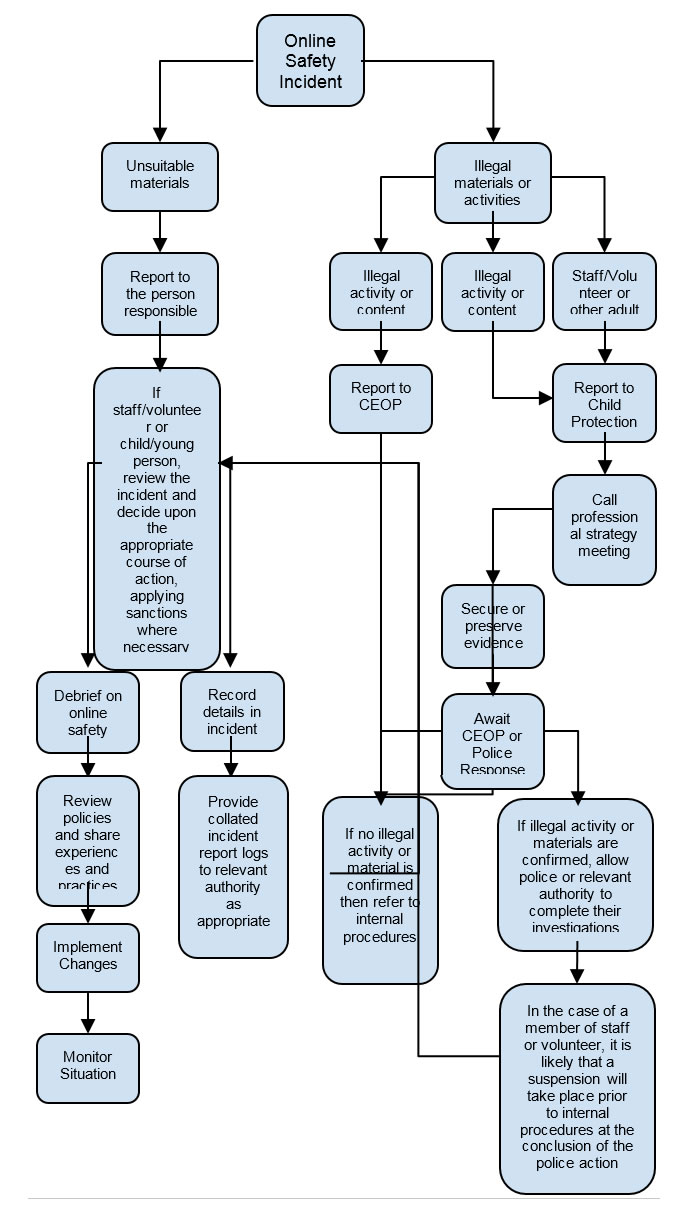
Responding to Incidents Flow Chart
Legislation
Schools should be aware of the legislative framework under which this E-Safety Policy and guidance has been produced. It is important to note that in general terms an action that is illegal if committed offline is also illegal if committed online.
It is recommended that legal advice is sought in the event of an e safety issue or situation.
Computer Misuse Act 1990
This Act makes it an offence to:
- Erase or amend data or programs without authority;
- Obtain unauthorised access to a computer system;
- Obtain unauthorised access to a computer system with the intent of committing further crimes;
- “Eavesdrop” on a computer;
- Make unauthorised use of computer time or facilities;
- Maliciously corrupt or erase data or programs;
- Deny access to authorised users.
Data Protection Act 1998
This protects the rights and privacy of individual’s data. To comply with the law, information about individuals must be collected and used fairly, stored safely and securely and not disclosed to any third party unlawfully. The Act states that person data must be:
- Fairly and lawfully processed.
- Processed for limited purposes.
- Adequate, relevant and not excessive.
- Accurate
- Not kept longer than necessary.
- Processed in accordance with the data subject’s rights.
- Secure
- Not transferred to other countries without adequate protection.
Freedom of Information Act 2000
The Freedom of Information Act gives individuals the right to request information held by public authorities. All public authorities and companies wholly owned by public authorities have obligations under the Freedom of Information Act. When responding to requests, they have to follow a number of set procedures.
Communications Act 2003
Sending by means of the Internet a message or other matter that is grossly offensive or of an indecent, obscene or menacing character; or sending a false message by means of or persistently making use of the Internet for the purpose of causing annoyance, inconvenience or needless anxiety is guilty of an offence liable, on conviction, to imprisonment. This wording is important because an offence is complete as soon as the message has been sent: there is no need to prove any intent or purpose.
Malicious Communications Act 1988
It is an offence to send an indecent, offensive, or threatening letter, electronic communication or other article to another person.
Regulation of Investigatory Powers Act 2000
It is an offence for any person to intentionally and without lawful authority intercept any communication. Monitoring or keeping a record of any form of electronic communications is permitted, in order to:
- Establish the facts;
- Ascertain compliance with regulatory or self-regulatory practices or procedures;
- Demonstrate standards, which are or ought to be achieved by persons using the system;
- Investigate or detect unauthorised use of the communications system;
- Prevent or detect crime or in the interests of national security;
- Ensure the effective operation of the system.
- Monitoring but not recording is also permissible in order to:
- Ascertain whether the communication is business or personal;
- Protect or support help line staff.
- The school reserves the right to monitor its systems and communications in line with its rights under this act.
Trade Marks Act 1994
This provides protection for Registered Trade Marks, which can be any symbol (words, shapes or images) that are associated with a particular set of goods or services. Registered Trade Marks must not be used without permission. This can also arise from using a Mark that is confusingly similar to an existing Mark.
Copyright, Designs and Patents Act 1988
It is an offence to copy all, or a substantial part of a copyright work. There are, however, certain limited user permissions, such as fair dealing, which means under certain circumstances permission is not needed to copy small amounts for non-commercial research or private study. The Act also provides for Moral Rights, whereby authors can sue if their name is not included in a work they wrote, or if the work has been amended in such a way as to impugn their reputation. Copyright covers materials in print and electronic form, and includes words, images, and sounds, moving images, TV broadcasts and other media (e.g. youtube).
Telecommunications Act 1984
It is an offence to send a message or other matter that is grossly offensive or of an indecent, obscene or menacing character. It is also an offence to send a message that is intended to cause annoyance, inconvenience or needless anxiety to another that the sender knows to be false.
Criminal Justice & Public Order Act 1994
This defines a criminal offence of intentional harassment, which covers all forms of harassment, including sexual. A person is guilty of an offence if, with intent to cause a person harassment, alarm or distress, they:
- Use threatening, abusive or insulting words or behaviour, or disorderly behaviour; or
- Display any writing, sign or other visible representation, which is threatening, abusive or insulting, thereby causing that or another person harassment, alarm or distress.
Racial and Religious Hatred Act 2006
This Act makes it a criminal offence to threaten people because of their faith, or to stir up religious hatred by displaying, publishing or distributing written material which is threatening. Other laws already protect people from threats based on their race, nationality or ethnic background.
Protection from Harassment Act 1997
A person must not pursue a course of conduct, which amounts to harassment of another, and which he knows or ought to know amounts to harassment of the other. A person whose course of conduct causes another to fear, on at least two occasions, that violence will be used against him is guilty of an offence if he knows or ought to know that his course of conduct will cause the other so to fear on each of those occasions.
Protection of Children Act 1978
It is an offence to take, permit to be taken, make, possess, show, distribute or advertise indecent images of children in the United Kingdom. A child for these purposes is a anyone under the age of 18. Viewing an indecent image of a child on your computer means that you have made a digital image. An image of a child also covers pseudo-photographs (digitally collated or otherwise). A person convicted of such an offence may face up to 10 years in prison
Sexual Offences Act 2003
The new grooming offence is committed if you are over 18 and have communicated with a child under 16 at least twice (including by phone or using the Internet) it is an offence to meet them or travel to meet them anywhere in the world with the intention of committing a sexual offence. Causing a child under 16 to watch a sexual act is illegal, including looking at images such as videos, photos or webcams, for your own gratification. It is also an offence for a person in a position of trust to engage in sexual activity with any person under 18, with whom they are in a position of trust. (Typically, teachers, social workers, health professionals, connexions staff fall in this category of trust). Any sexual intercourse with a child under the age of 13 commits the offence of rape.
Public Order Act 1986
This Act makes it a criminal offence to stir up racial hatred by displaying, publishing or distributing written material which is threatening. Like the Racial and Religious Hatred Act 2006 it also makes the possession of inflammatory material with a view of releasing it a criminal offence. Children, Families and Education Directorate page 38 April 2007.
Obscene Publications Act 1959 and 1964
Publishing an “obscene” article is a criminal offence. Publishing includes electronic transmission.
Human Rights Act 1998
This does not deal with any particular issue specifically or any discrete subject area within the law. It is a type of “higher law”, affecting all other laws. In the school context, human rights to be aware of include:
- The right to a fair trial
- The right to respect for private and family life, home and correspondence
- Freedom of thought, conscience and religion
- Freedom of expression
- Freedom of assembly
- Prohibition of discrimination
- The right to education
These rights are not absolute. The school is obliged to respect these rights and freedoms, balancing them against those rights, duties and obligations, which arise from other relevant legislation.
The Education and Inspections Act 2006
Empowers Headteachers, to such extent as is reasonable, to regulate the behaviour of students / pupils when they are off the school site and empowers members of staff to impose disciplinary penalties for inappropriate behaviour.
The Education and Inspections Act 2011
Extended the powers included in the 2006 Act and gave permission for Headteachers (and nominated staff) to search for electronic devices. It also provides powers to search for data on those devices and to delete data. (for DfE guidance – http://www.education.gov.uk/schools/pupilsupport/behaviour/behaviourpolicies/f0076897/screening-searching-and-confiscation
The Protection of Freedoms Act 2012
Requires schools to seek permission from a parent / carer to use Biometric systems
The School Information Regulations 2012
Requires schools to publish certain information on its website:
